Portfolio Design #01: Introduction, Hosting, & Architecture Overview (Edge)
Introduction
This is the first part of an X-part series going over the different aspects of my portfolio and blog.
Original Portfolio Flaws
I had a pre-existing portfolio hosted on this domain for about a year or two now and I grew tired of it.
Cost
It cost around \(10 - \)12 per month to host. While inexpensive, for something that realistically saw about 5 views per-month, it was unnecessary. Adding to this, the hosting choices I made allowed for easy-to-scale pricing, which is good for larger projects, but it meant ensuring I keep up with billing to see how much it cost monthly.
Architecture
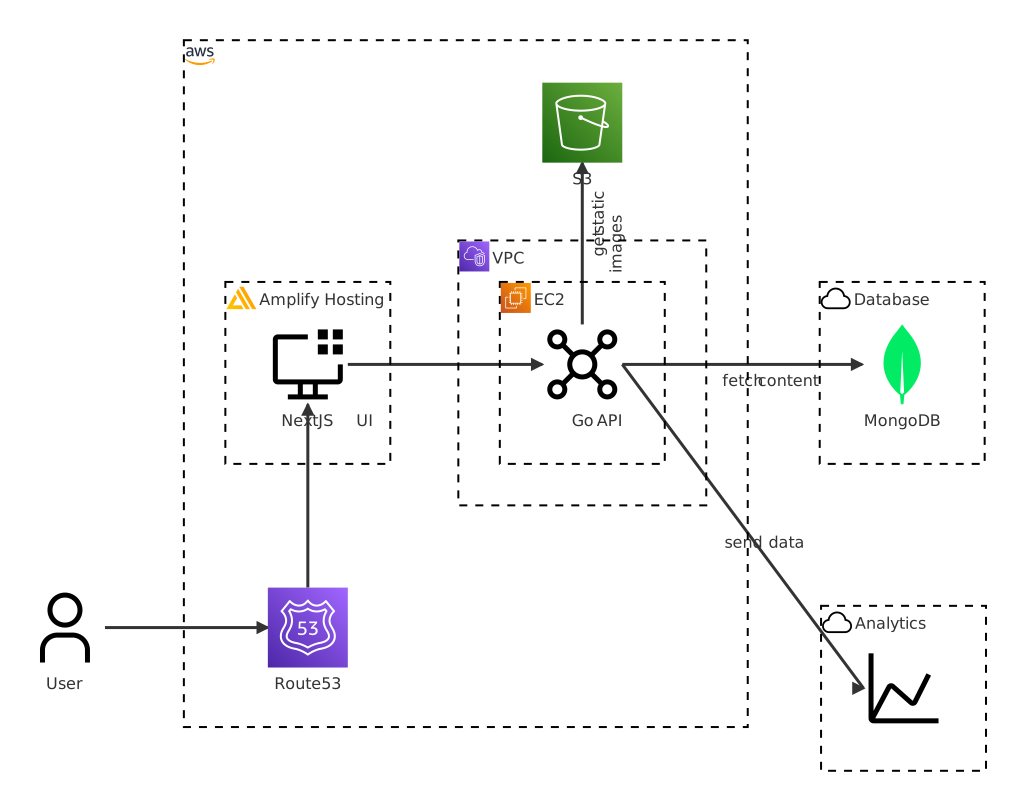
While I used similar languages (Go and JavaScript,) I had an unnecessarily complicated setup. I was using multiple services, separating my API from frontend, as well as using random cloud services to help with monitoring and analytics. While these may make sense for a medium-to-large project, my portfolio was not one. It had made updating anything surrounding the project a chore.
API Design & Database
I was also using NoSQL (MongoDB Atlas) for storage of my website’s content. I originally chose this because it was free, even though for every piece of data stored (i.e. profile, work experience, blog content), there was a set structure to validate.
I also used protocol buffers for the API, which meant an extra generation step to keep the contract between my frontend and APIs in sync. This wasn’t a big deal, but again, it was something I chose to do because I could, not because it made sense (I did not require any performance benefits.) Protocol buffers are still nice though.
Change of Plans
As the final nail in the coffin, I wanted to work on a Max4Live project and write a post about it – if it came out successfully. And when I was trying to figure out how I was handling blog posts in my previous portfolio, I realized I’ll need to manually query the database. This is an annoying pain-point. It would be nice if I had an easier way to manage content. Like a system to manage content, hmm.
I didn’t want to use Wordpress, or any other pre-existing Content Management System or a “website builder”, though. I wanted my own self-written system. It would be time-consuming, but if I did it right, it would save money, and help me manage the entirety of my portfolio and blog.
Portfolio (v4)
As stated in the previous section, I wanted a portfolio that can properly function as a blog, an easy way to manage the portfolio’s content without needing to query the database manually, and I didn’t want to keep paying $10+ per month at a variable rate.
There were two sets of requirements – aside from the usual functional and non-functional requirements: realistic and ideal. Functional requirements matched for both.
Functional Requirements
- Users can access my portfolio (
/) - Users can view blog posts listing + individual blog posts (
/blog,/blog/{slug}). - Users should be able to filter and find relevant content.
- Blog posts are very quick to display regardless of device (i.e. no processing client-side)
- An admin can have a secured admin view.
- An admin can update content without making manual DB queries.
- An admin can get view page analytics to gain performance insights.
- An admin would upload Markdown content, which would get rendered as HTML content for users.
- Cost must not be variable, and should be less than $5 per month.
- It should be manageable from a developer perspective, meaning no unneccesary external services.
Scale
- Daily-Active Users (DAU)
- Realistic: 5 DAU
- Ideal: 1000 DAU
- Posts: 1 per week
- Images: 5 per post
Non-Functional Requirements
- High-Availability > Consistency
- I cared more about reader-access, it’s okay if blog posts take a while (1 day max) to propagate CRUDs.
- < 250ms latency
- Caching should alleviate database load.
- Since we’ll be doing server-side processing of posts, we’ll want to ensure we cache efficiently to avoid this constant load whenever a user accesses a blog post.
- The system should be non-blocking when an admin makes content updates.
A New Server
With the above requirements, I looked into different deployment methods. While it would have been fun deploying through Kubernetes, using a micro-service architecture to allow for easy horizontal scalability with an intra-cluster service mesh, I knew this would both cause the price to increase and be overkill for my low-traffic blog.
I ended up looking into different VPS providers for a cheap server I could deploy in. I could manage what I actually needed through a simple Docker Compose by deploying multiple containers and exposing through a small reverse proxy. I would lose ease-of-features like scalability and failover, but again, that isn’t necessary for a low-traffic personal blog.
I looked into Hetzner Cloud and Amazon’s VPS offerings, specifically AWS Lightsail.
Hetzner (around $5.87/month, converted from 4.99EUR) - 2 GB RAM - 2 vCPUs - 40 GB SSD - 1 TB Traffic
AWS Lightsail ($7/month, 3 months free) - 1 GB RAM - 2 vCPUs - 40 GB SSD - 2 TB Transfer
I ended up going with Amazon, since I had a Route53 hosted zone that I could easily configure staying within the AWS ecosystem. While this was $2 above my monthly requirement, at the time I believed this was the most straightforward way to get my blog live.
Thinking back, Hetzner was likely the safer choice. With my low-traffic requirement and because of how I less reliant I wanted to be on cloud services, it should have been the clear winner. I am actively monitoring my resource consumption, and will look into migrating if needed; as of now things are running smoothly, and I expect them to for years to come.
DNS & Me
While I originally was using AWS’ Route53 as my DNS, I ended up moving to Cloudflare. While Cloudflare has had some outages this past year (2025,) their pricing (free) as well as their built-in content delivery network (CDN) won me over. If I were to use Route53 + CloudFront, it would cost about an extra $0.50 per month. Which is not much, but I was already 40% over my set budget.
With Cloudflare’s free tier, thanks to their CDN, I don’t have to worry too much about my app being hosted in a single server.
Small Exposure
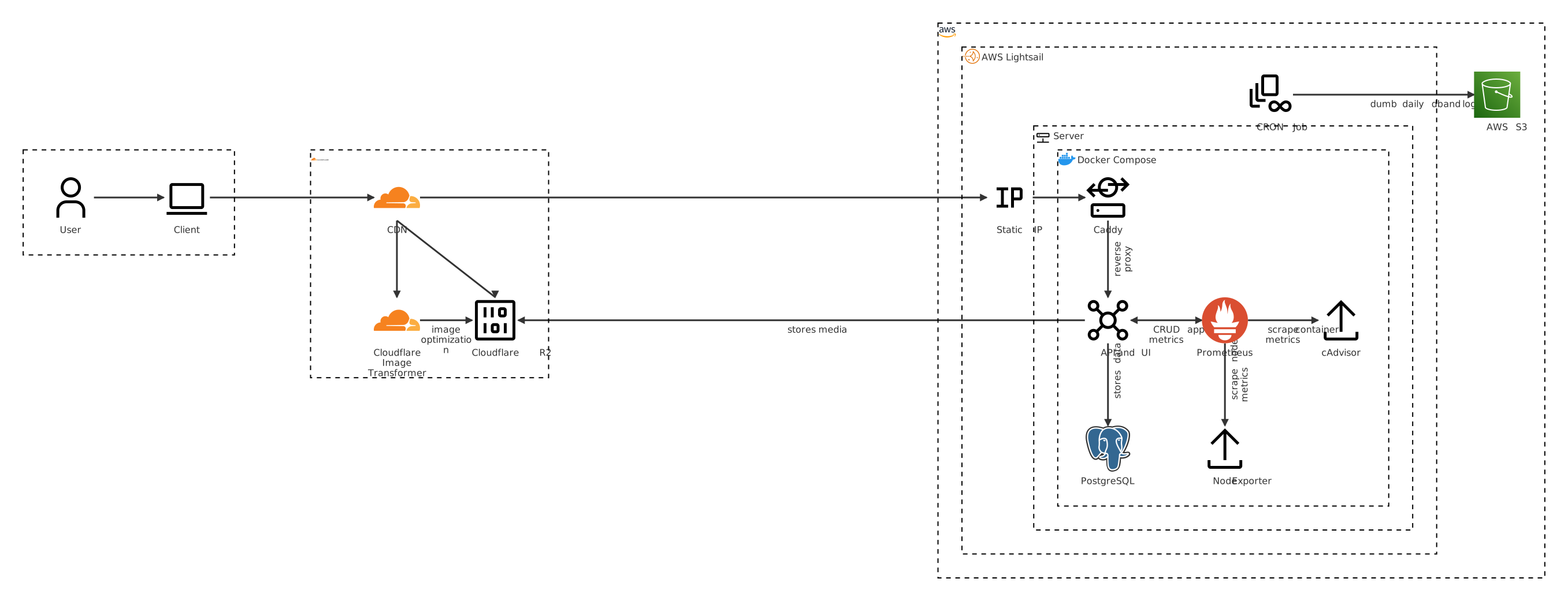
The service itself only exposes what is necessary to avoid any security risks. There are a few containers that run in the service, but most are only needed internally. The Docker Compose file defines some network isolations based on each’s purpose.
There are three networks defined edge: ingress, backend: api connections, and monitoring: analytics.
networks:
  edge:
  backend:
  monitoring:
On the edge, I defined containers for ingress traffic, mainly the Caddy reverse proxy. This exposes ports :80 and :443, which is what users would communicate with to hit the application.
  caddy:
    image: caddy:2-alpine
    container_name: portfolio-caddy
    ports:
      - "80:80"
      - "443:443"
    volumes:
      - ./Caddyfile:/etc/caddy/Caddyfile
      - caddy_data:/data
      - caddy_config:/config
    depends_on:
      - api
    networks:
      - edge
      - backend
      - monitoring
    restart: unless-stopped
    logging:
      driver: "json-file"
      options:
        max-size: "10m"
        max-file: "3"
The Caddyfile acts as a simple reverse proxy onto the app, redirecting www. traffic to a naked version.
www.fabianswe.com {
	redir https://fabianswe.com{uri}
}

fabianswe.com {
	reverse_proxy api:8080
	encode gzip

	# Automatic HTTPS
	tls {
		protocols tls1.2 tls1.3
	}

	# Security headers
	# Note: CSP header is set by the application with dynamic nonces for better security
	header {
		Strict-Transport-Security "max-age=31536000; includeSubDomains; preload"
		X-Content-Type-Options "nosniff"
		X-Frame-Options "DENY"
		X-XSS-Protection "1; mode=block"
	}

	# Logging
	log {
		output file /var/log/caddy/access.log
		format json
	}
}
On the backend network, we define resources used for backend communication. This includes Postgres (database) and the API. The only public port exposed is :8080, where as internally :9091 is exposed for the /metrics path in order for Prometheus to scrape metrics information.
  api:
    build:
      context: .
      dockerfile: Dockerfile
    container_name: portfolio-api
    image: ${DOCKERHUB_USERNAME}/portfolio:${VERSION:-latest}
    healthcheck:
      test: ["CMD", "curl", "-f", "http://localhost:8080/api/v0/health"]
      interval: 30s
      timeout: 10s
      retries: 3
      start_period: 40s
    expose:
      - "9091"
    ports:
      - "8080:8080"
    depends_on:
      postgres:
        condition: service_healthy
      prometheus:
        condition: service_started
    networks:
      - monitoring
      - backend
    restart: unless-stopped
    logging:
      driver: "json-file"
      options:
        max-size: "10m"
        max-file: "3"

  postgres:
    image: postgres:16-alpine
    container_name: portfolio-postgres
    volumes:
      - postgres_data:/var/lib/postgresql/data
    healthcheck:
      test: ["CMD-SHELL", "pg_isready -U ${POSTGRES_USER:-portfolio}"]
      interval: 10s
      timeout: 5s
      retries: 5
    networks:
      - backend
    logging:
      driver: "json-file"
      options:
        max-size: "10m"
        max-file: "3"
On the monitoring network, I defined containers used for analytics purposes. I’ll delve into this setup in more detail in a future post. No ports are exposed.
  prometheus:
    image: prom/prometheus:v3.8.1
    container_name: portfolio-prometheus
    volumes:
      - ./prometheus/:/etc/prometheus/
      - prometheus_data:/prometheus
    command:
      - '--config.file=/etc/prometheus/prometheus.yml'
      - '--storage.tsdb.path=/prometheus'
      - '--web.console.libraries=/usr/share/prometheus/console_libraries'
      - '--web.console.templates=/usr/share/prometheus/consoles'
      - '--storage.tsdb.retention.time=7d'
      - '--storage.tsdb.retention.size=5GB'
    networks:
      - monitoring
      - backend
    depends_on:
      node-exporter:
        condition: service_started
      cadvisor:
        condition: service_started
    restart: always
    logging:
      driver: "json-file"
      options:
        max-size: "10m"
        max-file: "3"

  node-exporter:
    image: prom/node-exporter:v1.10.2
    container_name: portfolio-node-exporter
    volumes:
      - /proc:/host/proc:ro
      - /sys:/host/sys:ro
      - /:/rootfs:ro
      - /:/host:ro
    command:
      - '--path.rootfs=/host'
      - '--path.procfs=/host/proc'
      - '--path.sysfs=/host/sys'
      - --collector.filesystem.ignored-mount-points
      - "^/(sys|proc|dev|host|etc|rootfs/var/lib/docker/containers|rootfs/var/lib/docker/overlay2|rootfs/run/docker/netns|rootfs/var/lib/docker/aufs)($$|/)"
    networks:
      - monitoring
    restart: always
    logging:
      driver: "json-file"
      options:
        max-size: "10m"
        max-file: "3"

  cadvisor:
    image: infocus7/cadvisor:0.55.1-grace # <- some local changes due to a bug, should be fixed in next official release
    container_name: portfolio-cadvisor
    privileged: true
    volumes:
      - /:/rootfs:ro
      - /var/run/docker.sock:/var/run/docker.sock:ro
      - /sys:/sys:ro
      - /sys/fs/cgroup:/sys/fs/cgroup:ro
      - /var/lib/docker:/var/lib/docker:ro
      - /dev/disk/:/dev/disk:ro
    networks:
      - monitoring
    command:
      - '--docker_only=true'
    restart: always
    logging:
      driver: "json-file"
      options:
        max-size: "10m"
        max-file: "3"
To Be Continued…
Deeper dives into my setup (i.e frontend, API, database, analytics) will be done in following blog posts.
Below is the current architecture: